If your website runs Google Analytics, a Facebook pixel, an embedded video, or a live chat widget, you are already dropping cookies on visitors before they click anything.
Regulators used to largely ignore that, but they do not anymore. In 2026, around twenty US states enforce their own consumer privacy laws, California penalties climb toward $8,000 per intentional violation, and European regulators still issue GDPR fines in the millions.
Those rising penalties turned cookie compliance into an everybody problem. The rules sound intimidating, but the work is fairly simple to manage with the right tools. A consent banner covers most of what the law asks, and a tool like CookieYes sets it up in minutes. We build these tools into the sites we launch, and I will show you how they work.
⚠️ Before We Start
We are glad to set these tools up for you, but we are not attorneys by any stretch. This is not legal advice, and if you handle sensitive data like health or payment records, please have counsel review your policies before you publish anything official.
How Tracking Cookies Get Onto Your Site
Every tracking tool you add, whether it is Google Analytics, a Meta pixel, a live chat widget, or an embedded YouTube video, plants a block of code in your site’s HTML.
The tracking data loads when the page opens and sets its own cookies right then, before your visitor agrees to anything. Here is what the code looks like in your backend:
<!-- Google Analytics -->
<script async src="https://www.googletagmanager.com/gtag/js?id=G-XXXXXXX"></script>

<!-- Meta (Facebook) Pixel -->
<script>fbq('init', '000000000'); fbq('track', 'PageView');</script>

<!-- Live chat widget -->
<script src="https://widget.chatvendor.com/loader.js"></script>
These are three tools with three sets of cookies, all firing on page load. To handle that by hand, you would find every script, hold it back until a visitor consents, and repeat the exercise every time you add a tool. If you miss one, your banner turns into more of a decoration rather than real protection. That is where a plugin like CookieYes comes into play.
💡 What we mean by “banner”
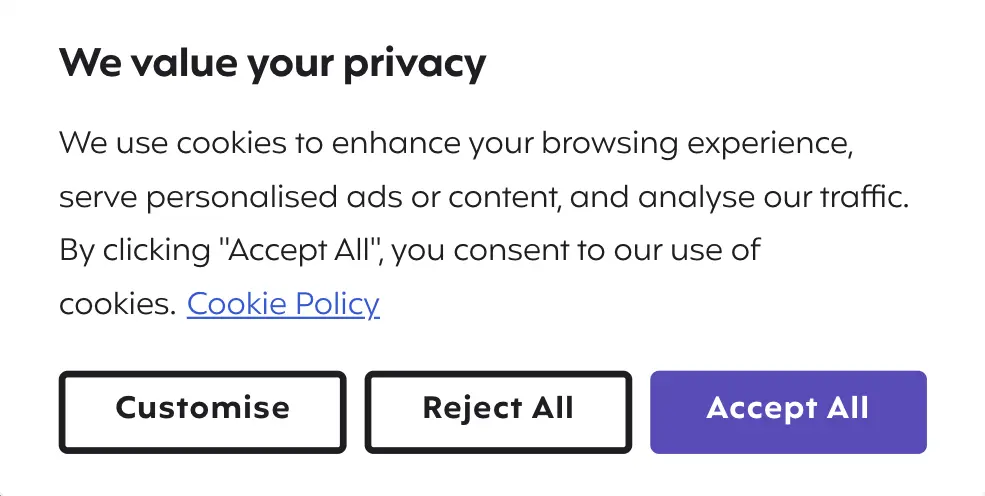
A cookie consent banner is the little notice that pops up when you land on a site. It tells you the site uses cookies and asks whether you agree. When you click Accept or Reject, the banner records your choice and loads only the cookies you allowed. Here’s ours:
What CookieYes Automates for You
CookieYes is a WordPress plugin and consent platform that organizes that authentication work. It runs on more than a million websites, carries Google’s consent management certification, and supports both the GDPR opt-in model and the CCPA opt-out model without switching tools. Here is the same job list of tasks done by hand versus with the plugin.|
The Job
|
Doing it by hand
|
With CookieYes
|
|---|---|---|
|
Find every cookie and script your site loads
|
Dig through your code and know what each vendor sets
|
The scanner crawls your site and sorts them for you
|
|
Hold trackers back until someone agrees
|
Write custom code to block and re-fire each script
|
Auto-blocks known scripts until a visitor consents
|
|
Show a banner with real Accept and Reject
|
Build and style it yourself
|
Ships ready, opt-in or opt-out
|
|
Serve the right banner by region
|
Detect location and swap banners
|
Geo-targeting handles it
|
|
List your cookies on a policy page
|
Write it, then update it every time you add a tool
|
Populated from the scan and kept current
|
|
Prove consent during an audit
|
Build your own logging
|
The consent log records it
|
Understanding What Privacy Laws Require From You
Most privacy laws share one core idea. You need to tell people what data you collect, give them a say in it, and protect what you hold. Other details decide how much work you face:
- The GDPR governs any business collecting data from EU visitors, regardless of whether the company is located in Europe or not. It uses an opt-in model, so non-essential cookies stay off until a visitor agrees.
- CCPA compliance works the other way. California’s law, expanded by the CPRA, uses an opt-out model, so you may load cookies but owe California residents a clear way to say no and a “Do Not Sell or Share My Personal Information” link. It applies past set thresholds, generally $25 million in revenue, data on 100,000 or more residents, or half your revenue from selling personal information.
- The other states weren’t far behind. Around twenty now enforce their own laws, with Indiana, Kentucky, and Rhode Island joining January 1, 2026. Most follow Virginia’s template, and twelve require you to honor Global Privacy Control, a browser signal that a visitor has already opted out.
You do not have to memorize all twenty. You do have to respect both opt-in and opt-out consent, because your visitors can come from everywhere.
Do I Need a Cookie Banner? Probably
Here is the honest test. If your site sets only strictly necessary cookies, the kind that keep a cart working or remember a login, you can skip the banner. The moment you add anything that tracks, measures, or advertises, you need one. Check what your site loads.
- Analytics like Google Analytics or Microsoft Clarity
- Advertising pixels from Meta, Google Ads, or LinkedIn
- Embedded YouTube or Vimeo videos
- Live chat, heatmaps, or A/B testing tools
Having any one of these means non-essential cookies, and non-essential cookies mean consent is required. Most business sites check at least two boxes, so most need a cookie consent banner. Not sure what your site drops? A CookieYes scan gives you the full list.
Setting Up CookieYes on WordPress
Getting CookieYes live takes less time than reading the laws it helps you follow:
- Install the plugin. Search “CookieYes” under Plugins in your WordPress dashboard, then install and activate. A banner appears with Accept, Reject, and Customize options.
- Run the scan. Connect the free CookieYes web app and let it crawl your site. It returns a categorized list of every cookie you set, which feeds your cookie policy page.
- Customize the banner. Match the colors and copy to your brand, keep Reject as prominent as Accept because several laws require equal footing, and write plain language visitors will read.
- Connect your tags. If you run Google Tag Manager, link CookieYes to Google Consent Mode v2 so your analytics and ads respect a visitor’s choice instead of firing regardless. This protects your data accuracy as much as your compliance.
Once the banner blocks scripts and the consent log records choices, the front-end work is done. The pages behind it still need attention.
The Pages Behind Your Cookie Banner
A banner points to documents that have to exist and stay accurate. Three pieces work together.
- Your cookie policy lists the specific cookies your site uses, what each does, and how long it lasts. CookieYes populates it from the scan and refreshes it as your cookie list changes.
- Your privacy policy, like ours, covers what personal data you collect and who you share it with. It belongs in your footer, linked to your cookie policy so a visitor can move between the two. Our breakdown of why a privacy policy matters covers what goes into one.
- Your consent records prove a visitor agreed to tracking, and CookieYes stores them, so an audit request gets an answer instead of a shrug.
A banner that links to a missing cookie policy, or a privacy policy that never mentions cookies, looks compliant without really being compliant.
Your GDPR and CCPA Compliance Checklist
Here is the short version, a GDPR compliance checklist that covers the US state laws too, since the overlap runs deep.
- Scan your site to find every cookie and tracking script you run
- Install a consent banner with equally weighted Accept and Reject options
- Block non-essential scripts until a visitor consents
- Show region-appropriate banners, opt-in for the EU and opt-out for California
- Honor Global Privacy Control signals coming from browsers
- Publish a cookie policy that lists your real cookies
- Publish a privacy policy in your footer that links to the cookie policy
- Add a “Do Not Sell or Share My Personal Information” link for California residents
- Keep consent logs you can produce during an audit
- Review the whole setup whenever you add a new tool
Try working down the list, and see what applies to your situation. This list covers what applies to the overwhelming majority of business websites.
Let Clockwork Handle Your Cookie Compliance
I know cookie compliance is usually low on the task list. With a tool like CookieYes, you can set most of this up yourself with the steps above. When we rebuild a site, we build it in from the start, so cookie compliance is one less thing you have to think about. If you need help on a site you already run, we can help you set up a cookie compliance tool and keep it running as part of a website care plan.
You get a site that respects your visitors’ privacy and holds up to scrutiny, and we will flag content that needs a lawyer’s review so you’re not guessing about legal exposure. If you would like us to take the lead from here, let’s talk.