
That “Urgent” Email About Your Website Is Probably a Scam

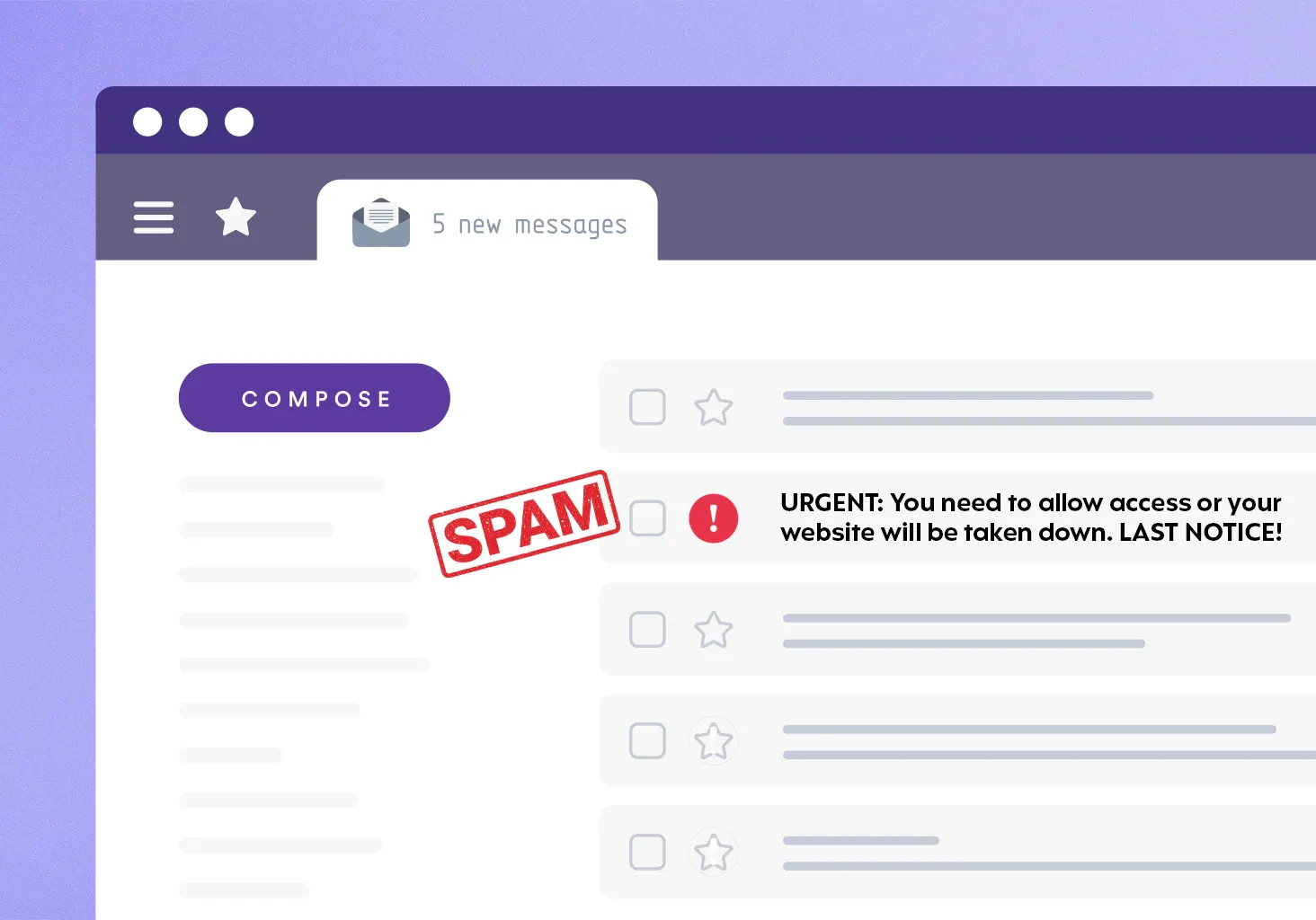
More and more businesses are getting the same unsettling email. The sender name looks like someone you work with. The message mentions your website, points to a recent technical audit, and gives you a hard deadline in a few days. If you miss the deadline, the email warns, and your site gets flagged, broken, or taken offline. The whole message looks like it came from the person who manages your site, and that resemblance is the point.
These emails have been landing in a lot of inboxes lately. Website owners across every industry are getting versions of the same message. I keep an eye on security stances across all of our client sites, so I have watched this scam get more sophisticated over the past several months with the rise of AI. The scam is worth understanding, because knowing how it works is most of what keeps you from falling for it.
Why These Scam Emails Suddenly Look So Convincing
Phishing is not new, but the quality took a sharp turn in a short window of time, and AI is the reason. The clumsy scam email of a few years ago gave itself away with broken grammar, strange phrasing, and a generic "Hi You" opening. Those tells are mostly gone.
Security firm Hoxhunt, which analyzes millions of real and simulated phishing attempts, found that AI-generated phishing made up around 4% of reported attacks in November 2025 and then jumped to 56% a month later, a roughly 14-fold surge in a single month that has held near 40% into 2026. The FBI has sounded the same alarm since late 2024, warning in a public advisory that criminals use generative AI to commit fraud at larger scale and, in the agency's own words, to correct the grammar and spelling errors that used to give schemes away.
Website owners need to keep an eye on this uptick in particular. A scammer can feed a few public details into an AI tool and get back a clean, professional message that names your business, references your platform, and adopts the calm tone of a vendor you already work with. The cost of producing a convincing fake has dropped to close to nothing, so these campaigns go out at enormous volume and still feel personal when one reaches you.
What These Scammers Want From You
Strip away the technical dressing and these messages want one of two things. Some push you toward a payment, asking you to settle an invoice or renewal fee through a link to keep your site from going dark. Others fish for credentials, and hope you will click through and enter your login somewhere that looks official but is not.
Urgency is how they get their foot in the door. A tight deadline paired with a scary consequence pushes you from thinking to reacting before you notice the details that do not add up. The FBI's guidance names that same pressure tactic and points to the same defense we give our own clients. The best option is to slow down, and verify through a channel you already trust. The vendors and professionals you work with do not operate on ultimatums.
What To Look Out For
Once you know the pattern, the cracks are easier to spot. The sender address is the first place to look. A message claiming to come from your web team but arriving from a free Gmail or Outlook address is a red flag every time, no matter how real the display name looks. Legitimate businesses send from their own domains.
Watch for manufactured urgency and a hard deadline, especially alongside a threat about your site being shut down. Be wary of any email that routes you to a payment link or asks for your login directly. And keep an eye out for small inconsistencies, like a greeting that feels slightly off, a reply-to address that does not match the sender, or a signature where the details do not quite line up. Any one of these on its own is worth a pause. Two or three together, and you can be confident you are looking at a fake.
What to Do When You Get A Suspicious Email
Do not click anything, and do not reply. A reply only confirms your address is live and worth targeting again.
To check whether a message is real, reach out to your actual provider through a channel you already trust: a phone number or email you have used before, rather than any contact information inside the suspicious email. The check takes two minutes and settles the question completely.
From there, report the email. In Gmail, the Report phishing option sits in the More menu next to Reply, and reporting it helps Google filter the next wave for everyone. If a fake page is impersonating a real one, Google's Safe Browsing team takes those reports directly, and serious financial fraud can go to the FBI through its Internet Crime Complaint Center.
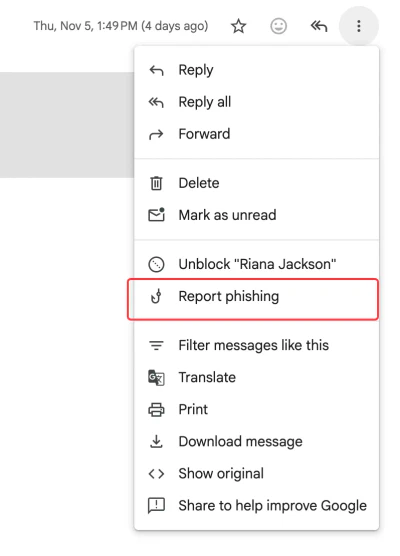
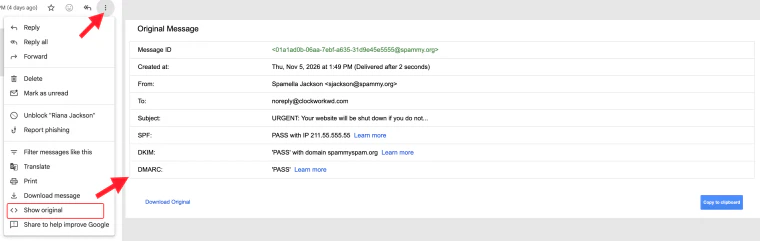
A report only helps if it includes the email's original headers, the routing details that a simple forward strips out. To grab them:
- Open the original email rather than forwarding it
- Copy the full headers, or the raw original message
- Include those with your report, or hand them to your web team to file
Reporting will not stop every scammer, since they cycle through addresses quickly, but each report feeds the systems that catch these things. Once you have reported it, delete the email so you do not click it later by mistake.
What a Real Website Maintenance Relationship Looks Like
When someone is genuinely caring for your site, this whole category of email scam attempts turns into background noise you can safely ignore.
A real website maintenance relationship means someone already watches your plugins, updates, backups, and security on a schedule. A surprise "critical action needed" notice is not news. Real providers communicate through established channels and bill through predictable, agreed-upon methods. We will never send a client an out-of-nowhere email demanding payment through a random link to keep a site online, and any provider worth keeping works the same way. That predictability is the point. You never have to decode whether a panicked message is legitimate, because the people handling your site do not send panicked messages.
A security layer like Cloudflare filters a great deal of malicious traffic before it reaches your site, and solid security fundamentals close the doors attackers try first. Neither one stops a scam email from reaching your inbox, since that part is a human problem, but together they make the site itself far harder to harm.
If you are not certain what your current setup covers, or you just want a clear read on where your site stands, our free website audit is a low-pressure place to start.
Frequently Asked Questions
How can I tell if an email about my website is a scam?
Check the sender's address first. A message from your web team that comes from a Gmail or Outlook address is a red flag. Other signs are a hard deadline, threats about your site being shut down, a payment link, or a request for your login. If you see two or three of these together, it's almost certainly a fake.
Should I reply to a suspicious email to check if it's real?
No. Replying only tells the scammer your address is active. Contact your provider through a phone number or email you've used before, not any contact info in the suspicious message.
How do I report a phishing email in Gmail?
Open the email, click the three-dot More menu next to Reply, and choose Report phishing. This helps Google filter similar emails for everyone. If you're also reporting it somewhere else, include the original message headers so it can be traced.
Will my website really be shut down if I miss the deadline?
No. Real web providers don't run on ultimatums or surprise deadlines. If someone is actually maintaining your site, updates and billing happen through channels you already know, so an urgent threat like this is a sign the email is fake.


